


What a RevOps Manager Should Audit Monthly in HubSpot


Revenue teams rely on HubSpot to orchestrate marketing, sales, and customer success operations. But when dashboards misfire, automations break, or CRM data decays, the result isn’t just operational friction, it’s lost revenue. For RevOps leaders, the solution isn’t just more tooling; it’s building a culture of regular system audits.
A monthly HubSpot audit doesn’t have to be complex. With a structured checklist and the right focus areas, RevOps teams can catch and fix problems before they spiral. In this article, we’ll walk through the five key areas every RevOps manager should review monthly, with a free downloadable checklist to guide your audits.
Why a Monthly HubSpot Audit Matters
Monthly CRM audits provide the clarity, accountability, and iteration cadence needed to keep revenue systems healthy. When issues go unchecked, small inefficiencies compound, damaging pipeline accuracy, attribution reporting, and customer experience.
A consistent monthly (or at least quarterly) audit routine:
-
Promotes proactive maintenance, not reactive firefighting
-
Keeps data aligned with evolving GTM motions
-
Supports faster decision-making and clearer ownership
Whether you’re running audits monthly, quarterly, or semi-annually, consistency is more important than frequency. At the end of this article, you’ll find a downloadable checklist to make this process easier.
Key Areas to Audit in HubSpot
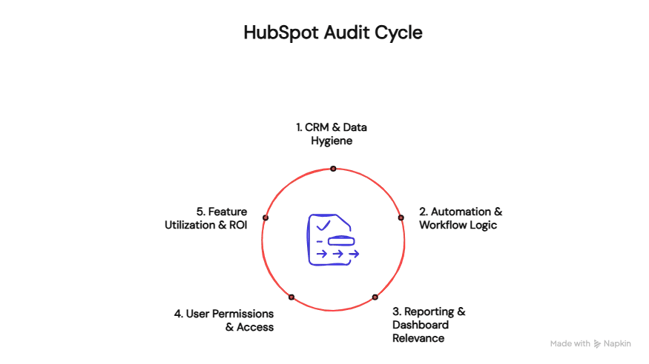
1. CRM & Data Hygiene
Clean, structured data is the foundation of every successful RevOps strategy. If your database is polluted with duplicates, outdated contacts, or inconsistent properties, everything from segmentation to reporting will suffer.
Key stakeholders to involve: CRM administrators, data analysts, sales operations.
Focus areas:
-
Accuracy of critical properties: lifecycle stage, lead status, deal stage • Identification and merging of duplicate records
-
Cleaning or requalifying inactive, outdated records Use a [CRM hygiene checklist] to spot common data decay patterns that can erode trust in your dashboards.
Learn more about Effective HubSpot Data Cleanup and Migration (Includes Webinar)
2. Automation & Workflow Logic
Automations are only effective when they reflect the current GTM motion. Over time, workflows become outdated or broken, leading to lead routing failures, customer journey gaps, or misaligned scoring.
Key stakeholders to involve: marketing operations, sales ops, automation specialists. Audit checklist:
-
Review all active workflows for accuracy and relevance
-
Ensure lead scoring reflects ICP and buying signals
-
Check MQL to SQL handoff timing and qualification rules • Log and prioritize any workflow errors or friction points

3. Reporting & Dashboard Relevance
Reporting is where data meets decision-making. But many dashboards go unused—or worse, mislead decision-makers due to flawed setup or outdated metrics.
Key stakeholders to involve: RevOps, sales leadership, marketing leadership. Ask:
-
Are dashboards aligned with current KPIs, such as funnel velocity or CAC?
-
Are reports intuitive and actionable for frontline and executive users?
-
Which dashboards are outdated, unused, or need refinement? Align with your broader revops reporting hubspot strategy.
4. User Permissions & Access
Security and clarity begin with role-based access control. Over time, users leave, change roles, or inherit outdated permissions. A monthly review protects data and simplifies user experience.
Key stakeholders to involve: RevOps, IT/security (if applicable), CRM admin. Audit points:
-
Remove inactive users
-
Review roles and permissions for accuracy
-
Check access by team: do users have the right views and toolsets? This is one of the lowest-effort, highest-return actions on your checklist.
5. Feature Utilization & ROI
Many companies only use a fraction of what HubSpot offers—especially at the Enterprise level. Your audit should reveal what’s underused and what could replace inefficient tools.
Key stakeholders to involve: platform owners, department heads, RevOps leadership. Consider:
-
Which paid features (e.g., custom objects, predictive scoring, campaigns) are underused?
-
Are any manual processes solvable with native tools?
-
What’s the current ROI from HubSpot as a RevOps platform? Each unused feature is either wasted budget or missed opportunity.
Operationalizing the Audit
A self-managed audit doesn’t need to live in your head. Use Notion, Google Sheets, or even a custom HubSpot dashboard to track findings and next steps. For each item: Assign an owner, Define priorities, set a deadline.
Audits aren’t just for spotting problems, they should spark meaningful iteration. Capture themes over time and use them to evolve your RevOps roadmap.
Your RevOps Strategic Partner
Triario doesn’t just identify RevOps gaps, we help teams operationalize scalable, revenue-aligned processes inside HubSpot. Whether you’re implementing RevOps for the first time or optimizing a mature stack, we partner with you to make HubSpot work like the growth engine it should be.

 Daniel Moreno J
Business Administrator from Universidad del Rosario. Passionate about marketing with more than 8 years of experience in digital marketing leading strategies and implementing SEO, SEM, Inbound Marketing and more. I work as an Implementation Strategist here at Triario!